
3 Best Practices to Driving Member Engagement

Congratulations on taking a leap forwards towards transforming your organization. The most successful programs adapt consistent practices around motivating their members for ongoing engagement. Here's a few helpful tips to guide your member communications and track real-time data along the journey.
|
Helpful Tips |
Templates and Resources |
When to Use |
|
Member Communications: Following each cohort launch, schedule thoughtfully crafted emails to to encourage members to activate their account and schedule their first coaching session. Continue to engage members to drive activation. |
Member Communications Template Download this toolkit with communications for every use-case across emails, slack—to executive stakeholders. |
Schedule emails at least 3-5 days following your program launch for optimal engagement. |
|
Managing Your Waitlist: Determine inactive members 7-10 days and swap them out for participants on your waiting list. BetterUp suggests a waitlist is that 10% of your launched population. Remove members via the PAD. |
BetterUp Introduction Template Use this email template for introducing BetterUp to new candidates once you have swapped their seats in PAD. |
Set a reminder to check your PAD activation metrics 7-10 days following launch. New members from the waitlist should be added with the same end date as your original cohort. |
|
Monitoring Activations in PAD:PAD admins should log into their BetterUp account and monitor member engagement. Healthy Program Goal by:
This can be monitored via the Activation Funnel within the PAD. |
Watch this video to get a brief overview of our People Analytics Platform (PAD) on how to track member activations and engagement throughout program activity. |
Members should have their first coaching sessions scheduled and completed by 21 days post launch. Utilize the CSV to monitor ‘first session date. |
A Playbook to BetterUps People Analytics Dashboard

Let's start here: Growth work is some of the hardest work we'll ever do.
It requires practicing vulnerability and active listening at the same time, which absorb a lot of mental capacity when flying a plane full of passengers. And when you're enroute to an entirely new destination like the present times, the visibility of air traffic is even more critical to landing.
That's where we come in. Our People Analytics Dashboard (PAD) is your cockpit to monitor behavioral signals across your organization. Understanding where your members are in their growth journey and what this means can help you create optimal employee experiences that foster high-performing teams.
It's safe to say we're all flying to a new destination with the honor (and pressure) of helping others live with greater clarity, passion, and purpose. To that end, we've upgraded our PAD and member experience to help you capture the metrics that matter most and maximize the impact of your BetterUp program. Use this guide to navigate the latest additions to your PAD key features and get a preview of what's improved for your members' experience.
Overview of BetterUp PAD Features

The all-new intelligent homepage curates an entirely personalized dashboard – where you can visualize member engagement and see the impact it's driving. Beyond usage and satisfaction data, you'll gain deeper insights into the health of your organization and the well-being of your people.
Upon logging onto PAD, you'll notice we've simplified the interface to guide an intuitive experience that curates the most relevant insights to you. The simplified navigation bar is divided into three tabs you can easily navigate across the top.
- Home Page: a curated overview that points to the insights most relevant to your business.
- Reports: a complete menu directory of all your data insights available.
- Admin: your program settings and administrative features for making changes throughout your journey.
Actions and Announcements
Curated exclusively for our partners, this section will feature guidance and resources specifically tailored to help you expertly manage your BetterUp program. Resources will include education on people analytics, helpful checklists, peer-to-peer stories, and more. Let your Customer Success Manager know if there's something specific you'd like to see in the future.
Reporting Insights
Reporting insights for you will surface three highly relevant data points across your organization. Your homepage overview will highlight a growth metric, engagement, and satisfaction track to get a pulse on program performance. To dive deeper into these components, select the report you're interested in or click "see all reports" in the top right corner.
Curated Stories and Population Heat maps

Curated stories allow you to dig into the unique outcome metrics and people insights relevant to your solution with BetterUp. These qualitative insights help you go deep on data based on our Whole Person Model and explain behavioral shifts to competencies and outcomes that matter to you, allowing you to understand and demonstrate the impact on talent.
Our new heat map feature surfaces data based on segments relevant to your business, comparing populations so you know where to focus development efforts as a leader.
How to Navigate Your Reporting Features
Use this section to walk through the varying insights previously only available in QBRs.
Reporting Insights: Your Curated Stories
When selecting the reporting tab, you'll notice a section on curated stories now sits at the top of your insights. Specifically, this is where you can better understand what behavioral signals lead to the metrics you're seeing and why. Additionally, you can now view your benchmark data against all of BetterUp's member population or a specific industry or role.
At the top, we can filter by what's relevant to your company and context. For example, maybe you just expanded to APAC markets and want to filter to that population specifically; you can do that here.
PAD heat maps and filtering are powered by our secure and easy to implement HCM integrations. Connecting BetterUp with your HCM via API or SFTP integration ensures your PAD views are always and effortlessly accurate, and lets you compare behavioral insights and results by demographics like role, tenure or location..
Usage & Engagement
The usage page lets you view exactly what engagement is like across your population. For example, we typically see about 80% engagement in the last 30 days, sometimes higher. This has much more usage than your average learning program – because your people are getting an entirely personalized, holistic experience to which they want to return.
Member Satisfaction
In this context, member satisfaction refers to the session quality area because this is direct member feedback confirming if it is a positive experience. Across all people who use BetterUp, we see 75% of sessions rated as either Amazing or Life-Changing.
Trending Topics
If you're curious about what patterns are surfacing across coaching discussions, this section provides an aggregate view of what members are navigating. You can view month-to-month what's happening at a macro level and within your business context and what your members are talking about to navigate.

This information is powerful because it allows organizations to better support their people by truly understanding what they are working through. This data can be used to understand what their people want and need to make informed decisions on employee programs.
Our people analytics data is core to who you are as an organization and how coaching programs impact your culture. To quickly and easily share these insights with others in the company, select the download page to export your report.
BetterUp Manager Involvement Guide
Your direct report is investing in their growth.
learning and coaching to succeed.
We use the latest research across the behavioral sciences, technology, and coaching to help people grow. Growth happens when we develop new mindsets,
Because it works. 1:1 coaching is proven to be the most effective way to facilitate long- term, scalable growth for individuals and organizations. I thought I was my direct report’s coach? A dedicated, expert coach is different than coaching you provide as a manager. A BetterUp coach will fuel your direct report’s
"(Employee) is thriving...we have come off the best sales
month ever and (employee) was front and center of that
success. He seems to be enjoying his BetterUp program,
and he is really adding value above and beyond his speciality area."
– Manager of employee growing with BetterUp
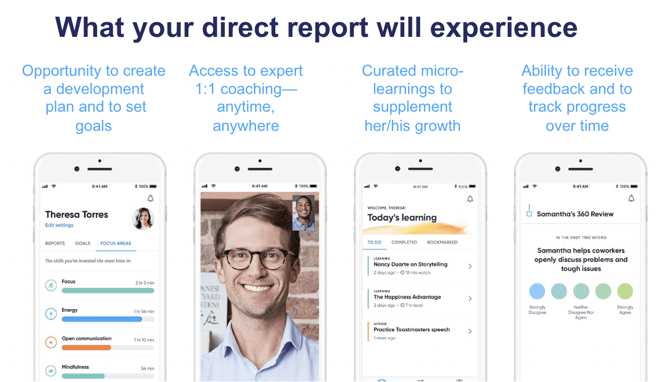
Your direct report’s journey
ONBOARDING
-
Setting preferences (including manager involvement*)
-
Taking BetterUp’s Whole Person Model (WPM) assessment to understand their strengths & opportunities
Selecting their coach & scheduling their first session
GOAL-SETTING
-
Reviewing their assessment results and areas of focus with their coach
-
Working with their coach to set their goals for the program
GROWING
-
Meeting with their coach regularly
-
Gaining greater awareness about themselves & working toward their goals
-
Talking through what is going on at work and at home
-
Diving into curated materials—articles, podcasts, exercises—selected for them by their coach
-
Discovering ways they can implement new learnings in their work and their life
REFLECTING
-
Reflecting on their BetterUp experience
-
CompletingPost-CoachingBetterUpWholePerson Assessment to measure growth
-
Closing out coaching conversations
-
Celebrating their growth!
How you can supercharge coaching
In the BetterUp Platform
Give Feedback
If your employee elects to involve you through the platform*, you can provide focus area recommendations and development feedback that will help your direct report and their coach design their development plan. This request comes right to your inbox, so be on the lookout!
Meet Manager Dashboard
After you provide feedback, you gain access to Manager Dashboard. This is your one-stop shop for information on your direct report—you can see top strengths, preferred management style, and what type of support they would like from you.
Provide Goal Feedback
Your direct report can share their goals with you. If they do, you can provide feedback!
Complete Post-Coaching Assessment
After a few months of coaching, you may receive a request for feedback. This assessment is intended to get your perception of your direct report’s growth since they started coaching. Help them recognize their growth and identify further development opportunities.
In Your Day to Day
Establish Expectations- Reinforce that development is important
- Discuss coaching in your regular 1:1’s
- Discuss Feedback
- Express confidence in their abilities
-
Tap into Coaching
-
Be a growth advocate – support coaching consistently
-
Make time to discuss feedback in an open and constructive wayActively look for integration points
Reflect & Celebrate!
- Make room for reflection with your direct report
- Provide honest feedback – recognize and celebrate growth